.png)
Introduction
The Smart Loading app allows you to significantly improve your website’s perceived speed by preloading resources and rendering pages in advance.
It is based on two complementary features:
- Early Hints: to preload critical resources
- Speculation Rules: Anticipating User Navigation
👉 Goal: to provide a smoother experience, with pages that load faster… and feel instantaneous.
What is the difference between Early Hints and Speculation Rules?
These two features serve the same purpose, but operate at different levels:
- Early Signs
- Preloads resources (CSS, JS, images, fonts)
- Improves the page's initial display
- Speculation Rules
- Anticipates user navigation
- Preload or pre-fetch pages that are likely to be visited
💡 In summary:
Early Hints speeds up page loading,
Speculation Rules speeds up navigation between pages
How does Early Hints work?
Early Hints allows you to instruct the browser to load certain critical resources in advance, even before the HTML page has been fully parsed.
Relevant resources
You can enable preloading for:
- JavaScript scripts
- Cascading Style Sheets (CSS)
- Images
- Fonts
Why does it work?
This allows you to:
- Reduce the initial display time
- Speed up page rendering
- Improve key metrics:
- First Contentful Paint (FCP)
- Largest Contentful Paint (LCP)
- Speed Index
💡 Good to know
The gains are often greater with CSS, followed by fonts.
⚠️ Warning
In some cases, preloading images, fonts, and JavaScript files can be counterproductive.
We recommend contacting CSE support if you have any questions about your configuration.
How do I enable Early Hints in the console?
From the Smart Loading app:

- Enable the Early Hints feature
- Select the types of resources to preload:
- Script
- Style
- Image
- Fonts
👉 You can fine-tune your configuration to suit your site and your priorities.
How does Speculation Rules work?
Speculation Rules helpsanticipate user actions by preloading or pre-rendering certain pages.
There are two possible scenarios:
- Prefetching→ The HTML page is downloaded in the background without being executed.👉 This allows the browser to prepare for navigation, but the final rendering still needs to be done when the user clicks.
- Prerendered→ The page is fully loaded and executed in the background.👉 The HTML and resources (JS, CSS, images) are downloaded and executed, and the page is already rendered, ready to display instantly.
💡 Real-life example
A user visits an e-commerce category page:
Product pages can be preloaded to speed up navigation.
How can I easily set up Speculation Rules?
The configuration is based on three key options, which can be accessed directly in the console.
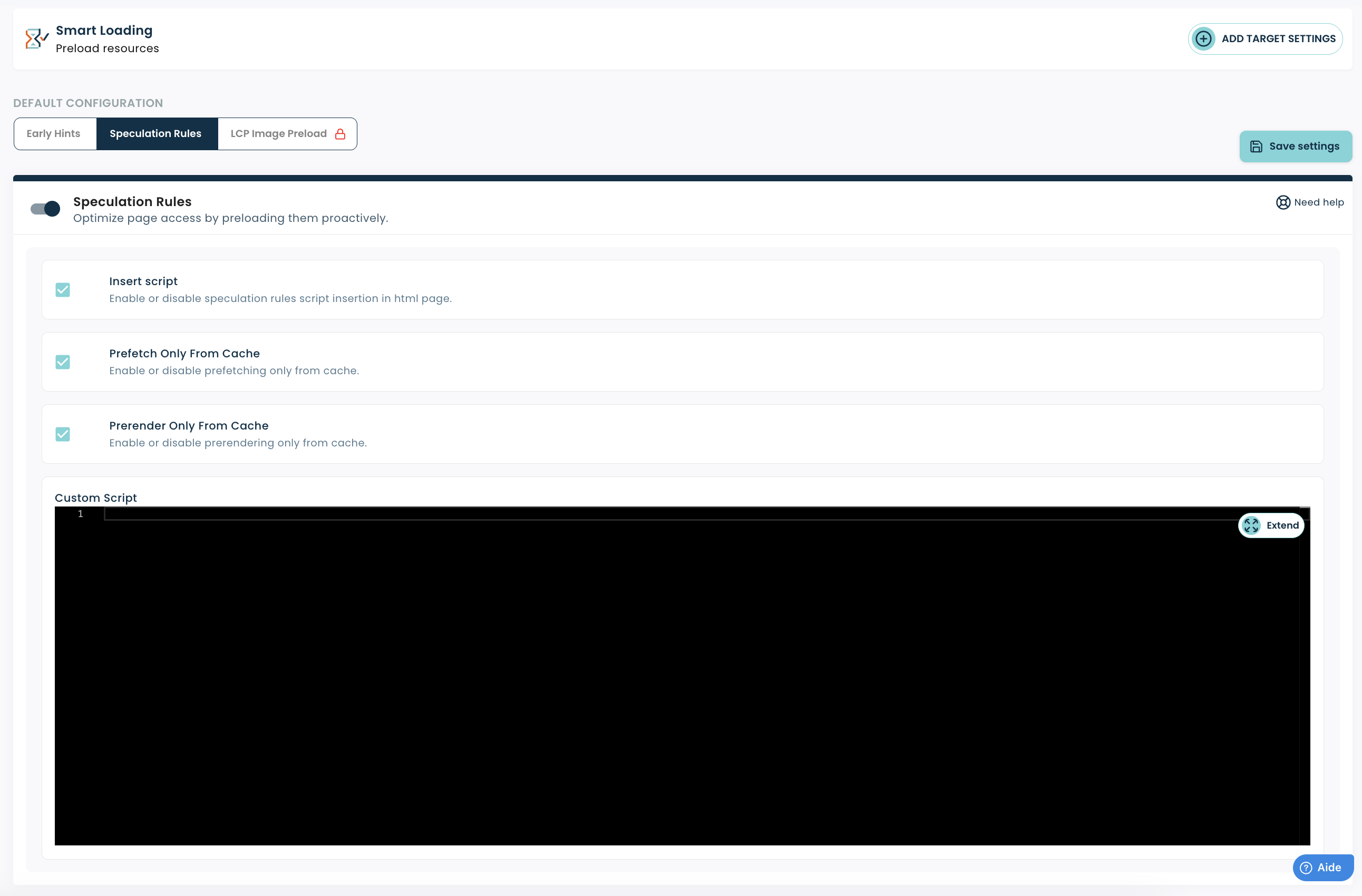
Insert the script
Enables or disables the automatic insertion of rules into your HTML pages.
- ✅ Recommended: enabled
- Allows you to easily enable the feature without any technical integration
Preload only from the cache
Allows you to limit preloading to pages already available in the cache.
- ✅ Recommended: enabled
- Avoid generating unnecessary traffic
- Protects your infrastructure
Pre-rendered from the cache only
Same principle, but applied to pre-rendering (which is more resource-intensive).
- ✅ Recommended: enabled
- Prevents server overload
- Ensures controlled performance
💡 Why are these options important?
They allow you to benefit from performance gains without risking an increase in server load.
Best practices for avoiding unintended consequences
To get the most out of Smart Loading:
- Enable features gradually
- Keep the "from cache" options enabled
- See how it affects your performance
👉 Features such as speculation rules (prefetch/prerender) can affect certain metrics, particularly TTFB as measured by CrUX, because pages are fetched in advance.👉 This impact isn’t always visible in traditional monitoring tools.
👉 For a more detailed analysis, you can specifically track prerendered page views in your Fasterize (RUM) monitoring by filtering by page view type.


- Adjust based on your users' actual behavior
Conclusion
The Smart Loading app is a powerful tool for improving your website's performance:
- Early Hints speeds up the loading of critical resources
- Speculation Rules makes navigating between pages smoother
By combining the two, you can provide a faster, smoother, and more enjoyable user experience.
👉 Start by enabling these features on a target such as a page type, then adjust based on your results.