.png)
Introduction
Malicious bots now account for a significant portion of web traffic. They can impact your performance, skew your analytics data, or even expose your site to automated attacks.
To address these challenges, DataDome offers a bot protection solution based on behavioral analysis. Integrating it via Fasterize allows you to quickly deploy this protection without the need for complex code changes.
In this article, learn how to effectively configure DataDome in Fasterize's EdgeSpeed.
What is DataDome bot protection?
DataDome automatically identifies and blocks suspicious behavior by analyzing how visitors interact with your site.
Specifically, the solution protects against:
- Content scraping
- Automated fraud
- Large-scale attacks (bots, scripts, etc.)
💡 Unlike traditional approaches, DataDome relies on behavioral detection rather than solely on signatures or IP addresses.
Legitimate bot vs. malicious bot
- Legitimate bots: Googlebot, Bingbot (SEO indexing)
- Malicious bots: scraping, brute force, fraud
The goal is to block the second ones without affecting the first ones.
Where do I configure DataDome in Fasterize?
Configuration is done directly within the DataDome application, which is available in Fasterize's EdgeSpeed product.
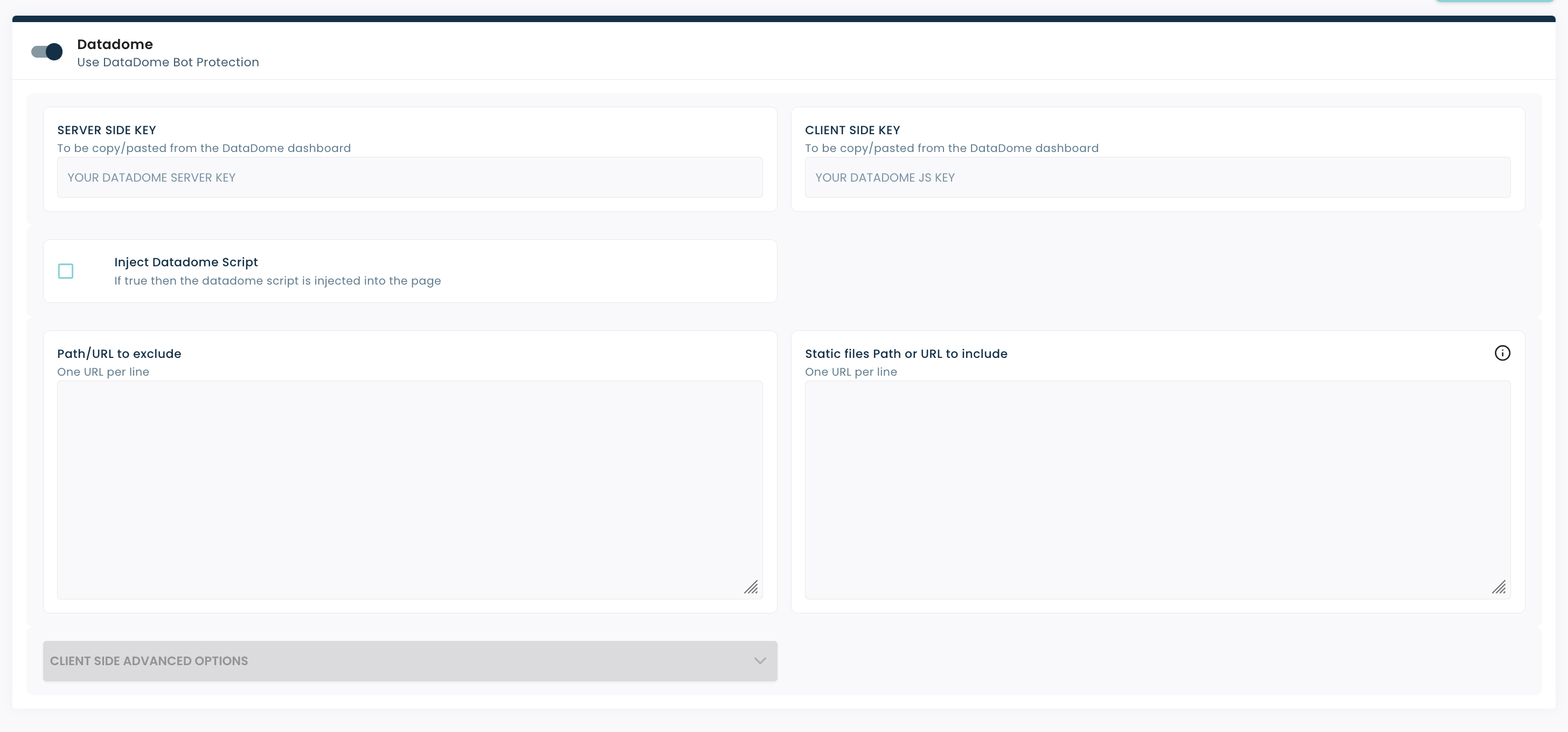
There you will find all the necessary settings:
- Authentication keys
- Script injection
- Exclusion Management
Configure DataDome keys
Server-side key
The server-side key is required.
- It is provided by DataDome
- It allows requests to be authenticated on the server side
- It must be copied from your DataDome dashboard
Client-side key
The client-side key is available, but its use depends on your configuration.
- Used on the browser side
Be sure to retrieve these keys from your DataDome interface before configuration.
Enable DataDome script injection
There is an option thatautomatically injects the DataDome script into your pages.
When should you enable this option?
- If the DataDome script isn't already integrated into your site
- To simplify deployment without technical intervention
What impact?
- The script is added on the client side
- It helps improve the detection of suspicious behavior
💡 If you've already integrated DataDome manually, there's no need to enable this option.
Exclude URLs from protection
Certain URLs should not be protected by DataDome, particularly to avoid false positives or functional blockages.
Why exclude URLs?
- Technical endpoints (tracking, stats)
- Static resources
- Files required for the website to function properly
How do I set it up?
- One line = one URL or path
- Configuration example:
/fstrz/r/stats-euwest1.fzcdn.net//dist/favicon/manifest.json/robots.txt
Include static files (advanced option)
A field also allows you to explicitly include certain static files in the protection.
- Use according to your specific needs
⚠️ This option requires advanced configuration and depends on your DataDome implementation.
Conclusion
Integrating DataDome into Fasterize allows you to quickly set up effective anti-bot protection.
Key takeaways:
- Easy setup via the Fasterize interface
- Protection based on behavioral detection
- Ability to fine-tune the rules (exclusions, scripts)
In addition, be sure to monitor the metrics on the DataDome side to assess the effectiveness of the protection and adjust your settings.