.png)
Introduction
INP (Interaction to Next Paint) is now a key metric in Core Web Vitals. It measures the time between a user interaction (click, keystroke, tap, etc.) and the corresponding visual update.
In other words:
The lower your INP, the more responsive your site feels.
Google recommends an INP of less than 200 ms to ensure a smooth experience.
On many websites, the decline in INP is not caused by the core code… but by third-party scripts (analytics, marketing tags, ads, widgets, etc.).
That is exactly what SmartINP helps optimize.
Why do third-party scripts degrade your INP?
When a user clicks on:
- Add to cart
- Submit a form
- Edit a product variant
- Open a menu
- …
Multiple scripts can run simultaneously:
- Business logic script (shopping cart updates, UI display, etc.)
- Analytics script
- Advertising script
- Marketing tags
All of them use the browser's main thread.
If a third-party script monopolizes this thread, even briefly, the expected display is delayed.
⚠️ Just a few dozen milliseconds of lag is enough to significantly degrade the INP, especially on mobile devices.
The more third-party scripts your site uses, the greater the risk—and you generally don’t have access to their code to optimize their performance.
SmartINP: Prioritize your business scripts at critical moments
SmartINP acts precisely at the moment of user interaction.
How it works:
- Prioritize business scripts
- Delay the execution of third-party scripts slightly
- Ensure that tracking continues to function properly
Result:
The main action (e.g., adding to cart) is executed immediately, without being blocked by external scripts.
💡 SmartJS optimization takes effect upon loading
💡 SmartINP optimization takes effect during interactions
How do I enable SmartINP in EdgeSpeed?
Activation is performed directly from the EdgeSpeed console within your domain's application settings.

Steps:
- Enable SmartINP
- Check the list of supported third-party domains
- Add or remove a domain as needed
- Back up and deploy
Most third-party scripts known to affect INP are already handled automatically.
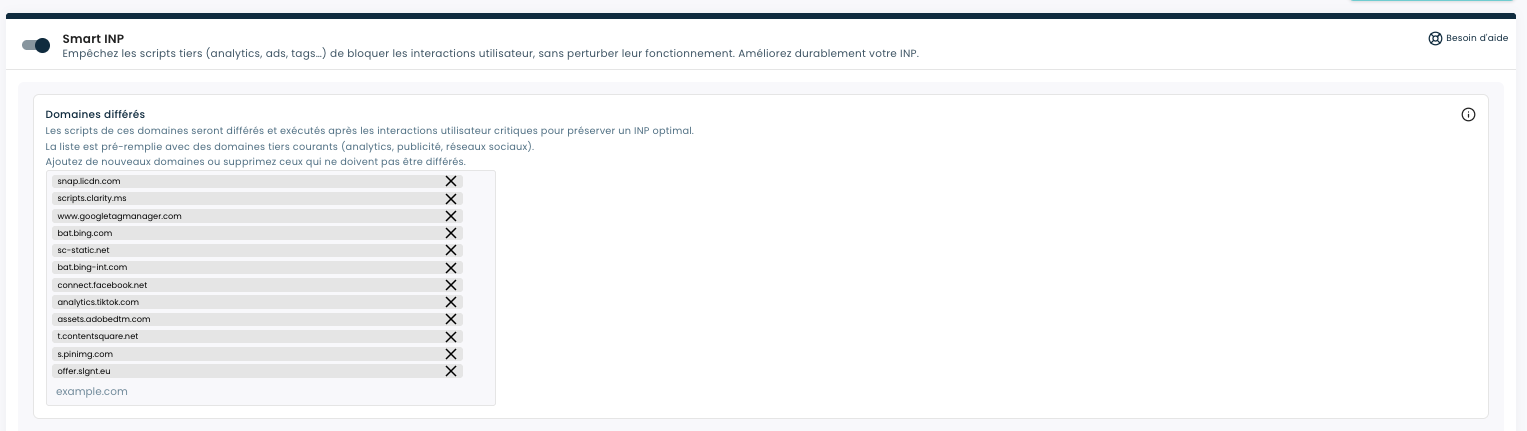
Adding a third-party domain: best practices
When manually adding a third-party domain, it is essential to validate critical interactions.
Recommended checklist:
- Test adding to cart
- Test the CTA buttons
- Test the forms
- Test dynamic navigation
- Test on mobile
⚠️ SmartINP must never compromise business functionality.
Always validate key user flows after activation or modification.
What results can you expect?
Observations made in various customer environments show:
- An improvement in the INP from 15% to 50%
- A particularly noticeable impact on mobile devices
- Up to an 85% increase in the number of URLs classified as fast in Search Console
Earnings depend, in particular, on:
- The number of third-party scripts present
- On the Complexity of Interactions
- Share of mobile traffic
Why should you incorporate SmartINP into your Core Web Vitals strategy?
SmartINP allows you to:
- To improve perceived responsiveness
- To improve your INP score
- To improve your Core Web Vitals performance
- Potentially improve your SEO visibility
- To enhance the mobile user experience
For websites that rely heavily on third-party scripts, SmartINP becomes a key enabler.
Conclusion
Third-party scripts are essential to your marketing and analytics strategy.
But they shouldn't slow down your critical interactions.
SmartINP lets you maintain control over interactivity by prioritizing your business logic at the critical moment: user action.