.png)
Creating a Targeted Rule in EdgeSpeed: A Complete Guide
Introduction
The targeted rule allows youto apply specific settings or exclude optimizations through its optimization features.
Each rule is based on one or more technical criteria (URL, path, device, etc.) that you can freely combine to create custom targets.
💡 Learn more: EdgeSpeed apps

How a targeted rule works
The targeted rules table lists the various filtering criteria to which optimizations are (or are not) applied. You can target based on:
- Request URL
- Query path
- URL in an HTML tag
- Device type
- Client IP address
- CSS selector
- …and more to come!
💡 You can combine multiple criteria to create a very specific target audience.

For each rule, there are two configuration options:
- Exclusion whether enabled or not:
- Unless otherwise specified, optimizations apply only to queries that match the rule.
- If excluded, the queries are not optimized.
- Rule status :
- Enabled: The rule is active, and the defined optimizations are applied
- Disabled: The rule is inactive; optimizations are ignored
- Disabled: All optimizations are turned off for this target
Create a targeted rule step by step
Click the " Add Target " button to open the creation window. You can configure:
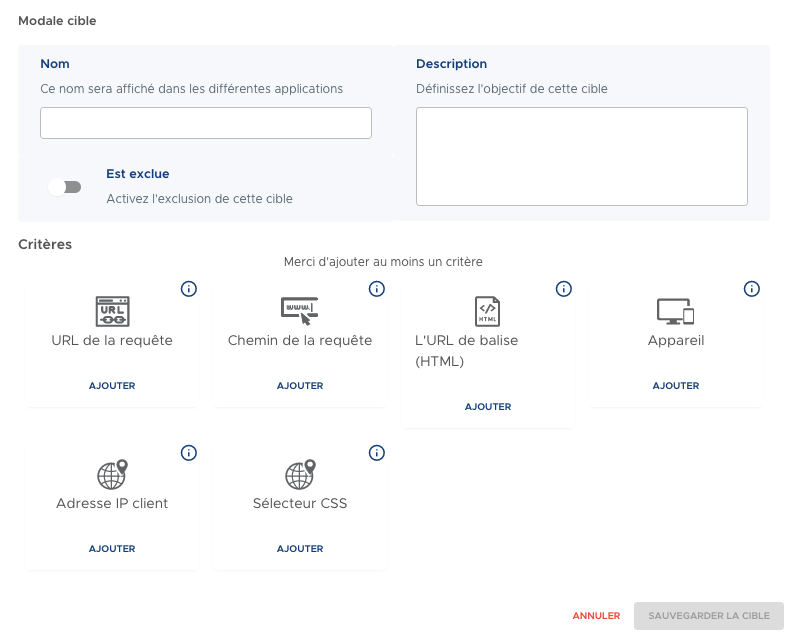
- Name: the name of the target (visible in all applications)
- Description: The purpose or objective of the rule
- Exclusion: Select this option to exclude optimizations for this target
- Criteria: Add one or more targeting criteria using the Add button
💡 You must specify at least one criterion for the rule to be valid.
Available criteria
Query URL
The full URL sent to Fasterize: protocol, domain, path, and parameters.

Example:
https://www.monsite.com/dossier/page.html?parametre=valeur
💡 View the detailed page: Request URL
Query path
The journey always begins with / and doesn't understand the settings.
.png)
Examples of regular expressions:
^/my-target-page\\.html$→ targets exactly/my-landing-page.html^/target-page/→ targets all pages that start with/target-page/
💡 See the detailed page: Query path
Tag URL (HTML)
URLs contained in HTML tags such as:
<img src="..."><link href="..."><script src="...">- or in the CSS properties (
url(...))
Example:

The expression /upload/my-slider-1\\.jpg targets all references to this image file, regardless of context.
💡 View the detailed page: Tag URL (HTML)
Device
You can target based on the type of device detected:
- Computer
- Mobile
- Tablet
- Former sailor
- Bot


💡 See the detailed product page: Device
Client IP address
Filtering is available by IP address in the following format:
- IPv4
- IPv6
- CIDR

💡 See the detailed page: Client IP Address
CSS selector
You can target elements using their CSS selectors:
- ID, class, or complex selector
Example:

.ma-zone img → targets all images within an element with the class my-zone
💡 See the detailed page: CSS Selector
Conclusion
Targeted rules are a key feature in EdgeSpeed that allow you to fine-tune your optimizations with precision. By combining criteria andexcluding specific targets, you maintain full control over the optimizations applied to your site.